
The 30-second recommendation
No single component creates a keyboard’s sound or feel.
Think of the keyboard as an acoustic system. The plate sets local stiffness, the mount controls how energy reaches the case, the case creates a resonant chamber, and foam removes selected frequencies. Switches and keycaps provide the initial impact.
- Plate stiffness and cuts
- Mounting structure
- PCB thickness and flex
- Case material and cavity
- Switch and keycap pairing
- Foam placement and amount
First, understand the sound system.
A key press creates two main impacts: the stem reaches the bottom of its travel, then returns and hits the upper housing. Those vibrations move through the switch, keycap, plate and PCB before reaching the case and desk.
Pitch describes how high or low the sound is. Volume is loudness. Resonance is the body or lingering ring added by the structure. Attack is how sharp the beginning of each key press feels and sounds. “Crisp,” “clacky” and “thocky” are useful listening words, but they are not standardized measurements.
Three switch feels. One personal choice.
Switch colors are useful shorthand, not universal standards. Start with the feel category, then compare spring weight, travel and sound.
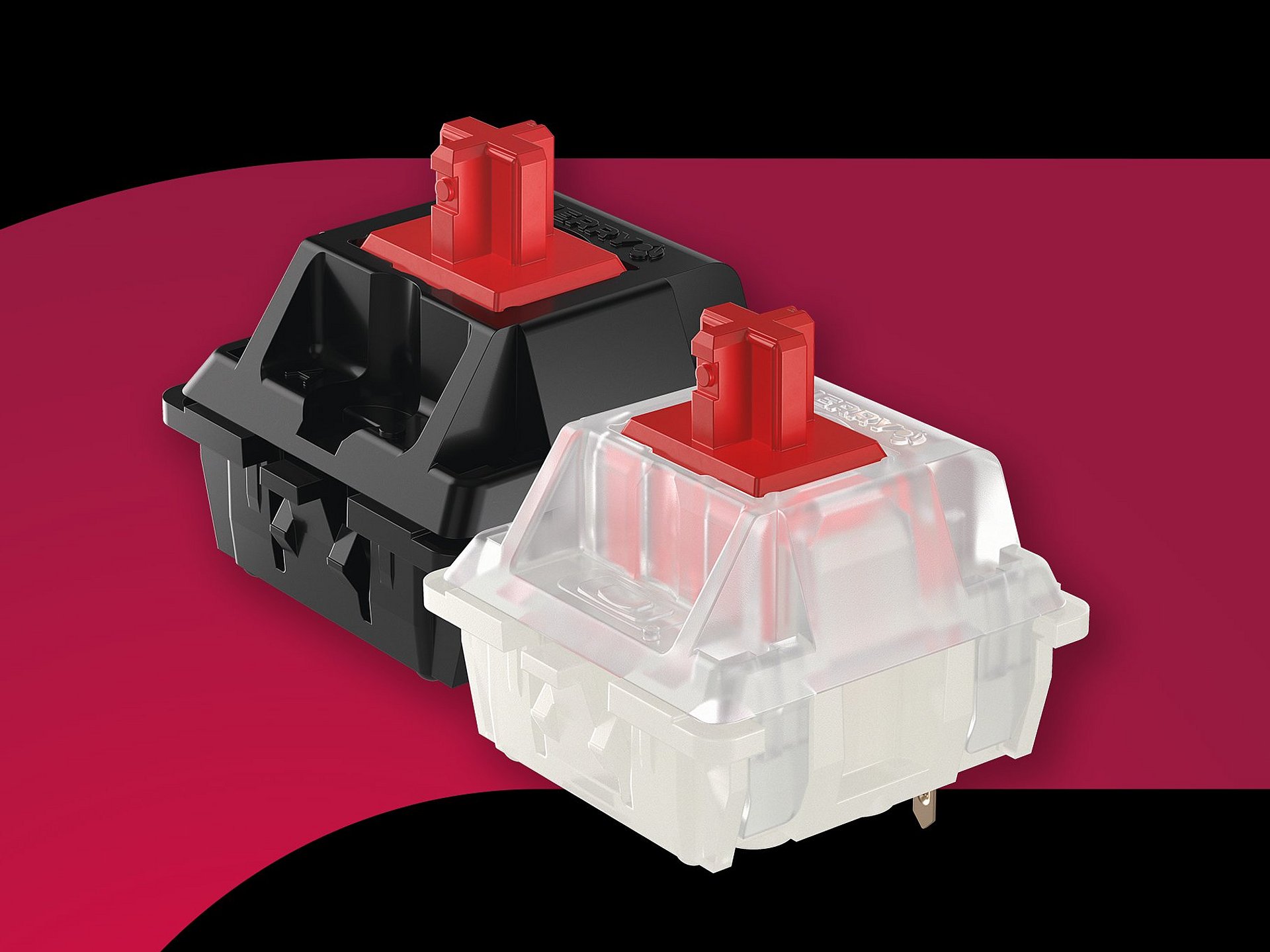
Linear
No tactile bump. Popular for gaming and equally valid for everyday typing.
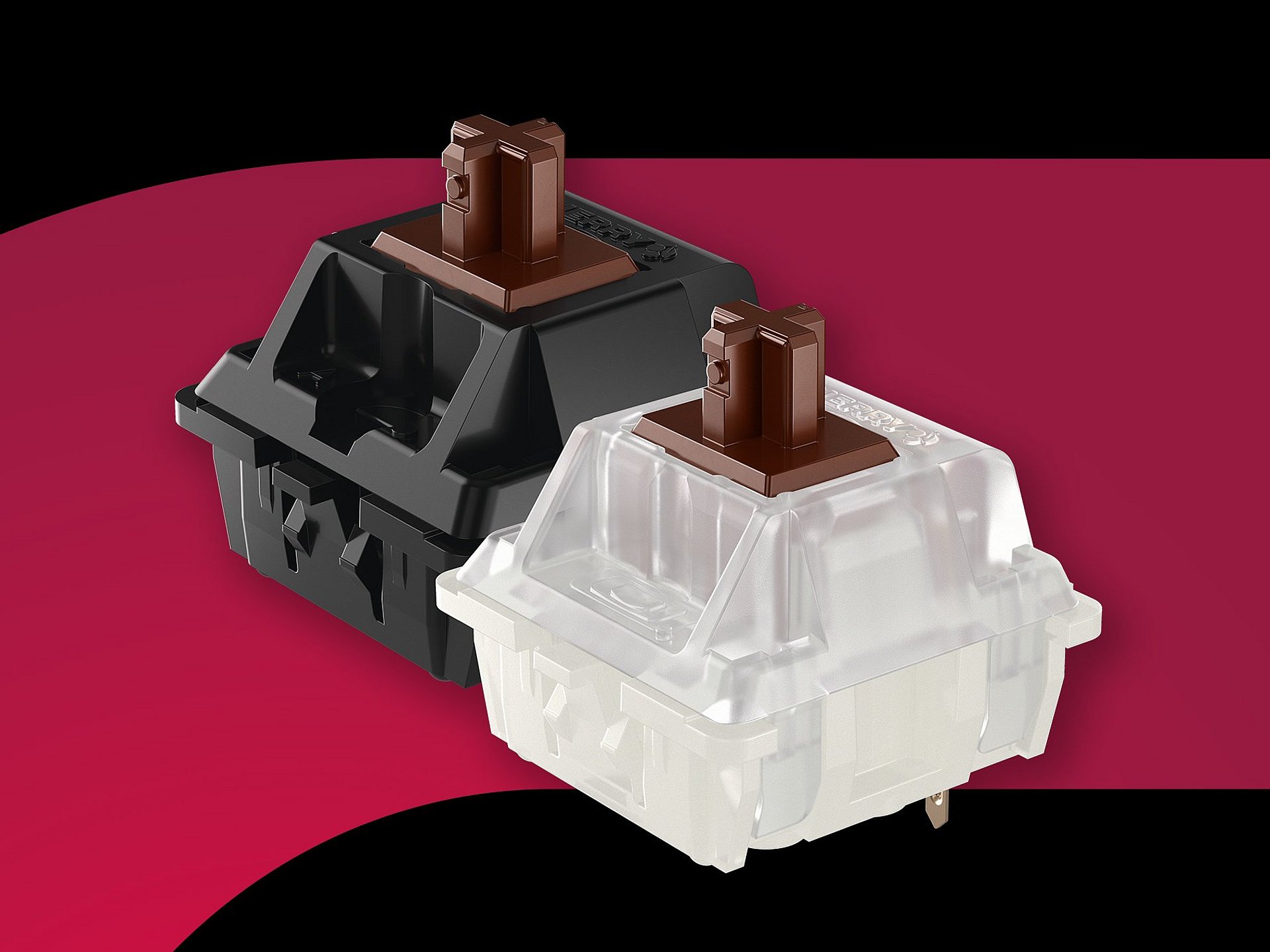
Tactile
A physical bump marks the press. A balanced choice for typing and mixed use.
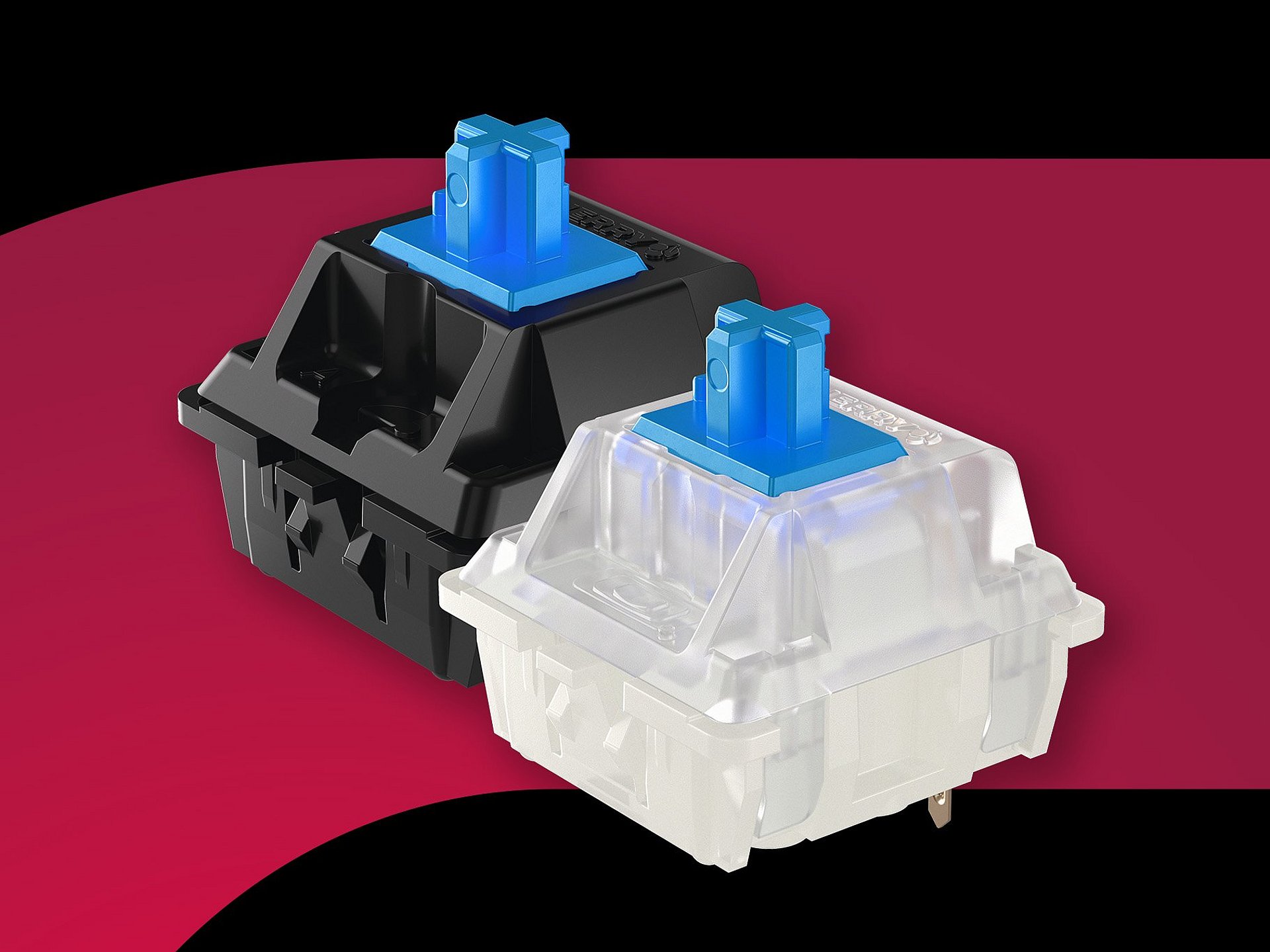
Clicky
A tactile bump plus an intentional click. Fun in private, risky in shared spaces.
Read the specification, not the switch color.
Names and colors are not standardized across manufacturers. Compare the numbers and mechanism of the exact switch.
The force near the electrical actuation point, usually stated in gf. It does not always describe how heavy the complete press feels.
Pre-travel is distance before actuation; total travel is the complete stroke. Shorter numbers can feel faster, but do not automatically improve control.
A longer stem pole may bottom out earlier against the housing, often creating a shorter, more immediate stroke and a more pronounced impact.
Internal dampening reduces bottom-out and return noise. The tradeoff can be a softer or less abrupt endpoint, depending on the design.

The force near full compression. Two switches with the same operating force can feel different if their bottom-out force or spring curve differs.
Long, multi-stage and progressive springs can change starting force, return speed and how quickly resistance builds. Length alone does not predict the full feel.
Five-pin MX switches add two plastic locating pins for PCB stability. They fit a compatible 5-pin PCB; the two plastic pins can be clipped for many 3-pin plates and PCBs.
Nylon, PC, POM and proprietary blends affect friction and resonance, but geometry, surface finish and tolerances matter as much as the material name.
Lubrication vocabulary
“Lubed” is not one fixed condition.
Lubricant can reduce friction, scratch and spring noise, but the application point, product and amount determine the result.
Applied during manufacturing and intended to be ready to use. Coverage and consistency vary by model and production process.
The switch is opened and lubricated manually. Results depend on technique; “hand-lubed” is not automatically better.
Sold without intentional added lubricant, or with only incidental manufacturing residue. Expect more raw material and surface character.
Lubricant is focused on the spring to reduce ping and crunch without necessarily changing the stem and housing feel.
Mechanical-switch brands you will often encounter.
This is a navigation aid, not a quality ranking. Each manufacturer produces multiple families, and collaborations may use custom molds, springs or materials.
Traditional mechanical or Hall Effect?
This is the first major system choice. A traditional mechanical switch sends a keypress when its internal metal contacts meet at a mechanically defined point. A Hall Effect (HE) keyboard reads the changing magnetic field between a magnet in the switch and a Hall sensor on the PCB, allowing the keyboard to estimate key position throughout the stroke.
Traditional MX mechanical
The switch defines physical actuation.
Linear, tactile and clicky mechanisms are widely available. Actuation is normally fixed by leaf and stem geometry, while the PCB reads an electrical on/off event. This ecosystem offers the broadest choice of feel, sound and replacement parts.
Hall Effect / magnetic
The complete system interprets movement.
The switch supplies physical motion and magnetic change; the sensor, PCB, calibration and firmware decide how that signal becomes an actuation. Most HE switches are linear, although newer specialty designs may add tactile behavior.
MX mechanical
Choose variety
- Broad linear, tactile, clicky and silent selection
- Fixed physical actuation point
- Cross-brand hot-swap is often possible within MX standards
- Strong for typing, sound tuning and long-term customization
Magnetic / HE
Choose control
- Adjustable actuation when supported by firmware
- Rapid Trigger can reset according to key movement
- Analog or multi-action behavior is platform-dependent
- Replacement requires exact magnetic-system compatibility
You choose how far a key travels before registering, within the range and resolution supported by that keyboard.
Reset follows upward key movement instead of waiting for one fixed reset point. Implementation quality depends on sensing and firmware.
A high polling rate and HE sensing are different specifications. Neither number alone guarantees lower end-to-end latency.
Spring weight, total travel, stem stability, lubrication and housing geometry still determine the physical typing experience.
An MX-shaped keycap stem only describes the keycap connection. Before replacing a magnetic switch, verify the approved switch list, magnet polarity and position, magnetic flux range, total travel, plate fit and firmware calibration. A switch can fit physically and still sense incorrectly.
Recognized HE switch makers and ecosystem names.
Manufacturer and consumer-facing brand are not always the same. Compatibility must be checked at keyboard-model level rather than assumed from the name.
Hall Effect is not an automatic upgrade for everyone. Choose it when adjustable actuation and movement-based reset directly benefit your games or workflow. Choose traditional MX when tactile and clicky variety, cross-board experimentation, typing character and long-term parts flexibility matter more.
Find the layout that fits your day.
A percentage describes the approximate layout size, not a universal key count. Start with the keys you need every day, then choose the smallest layout that keeps them accessible.
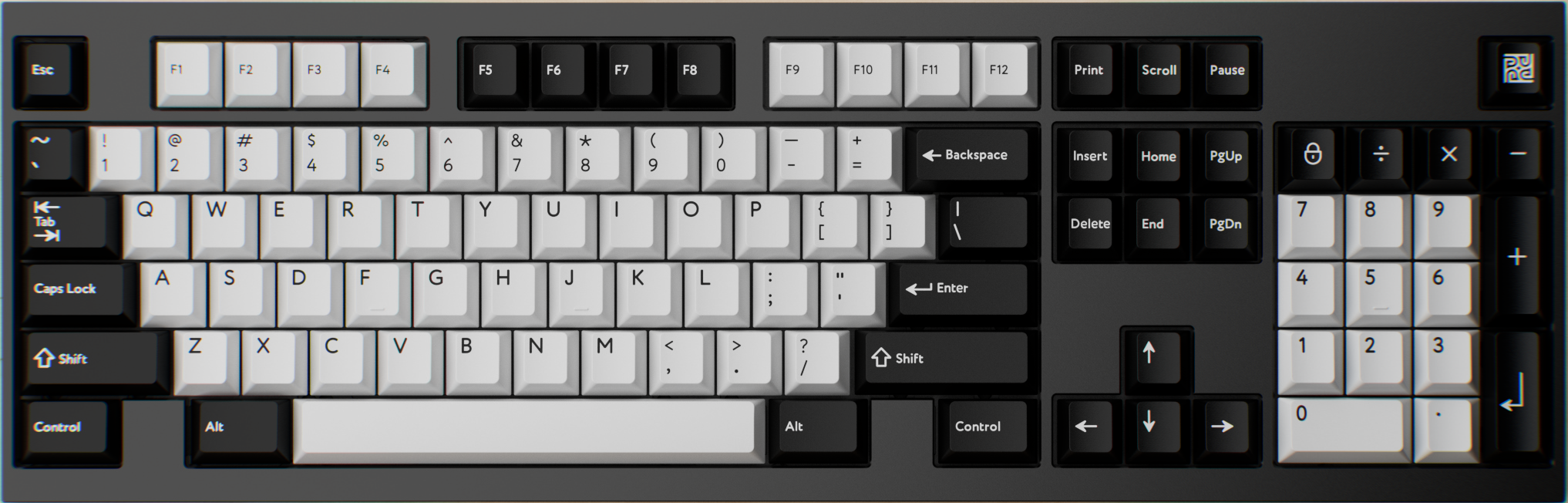
Full-size / 100%
Keeps the number pad, navigation cluster and function row. Best for finance, spreadsheets and frequent data entry.
Explore full-size kits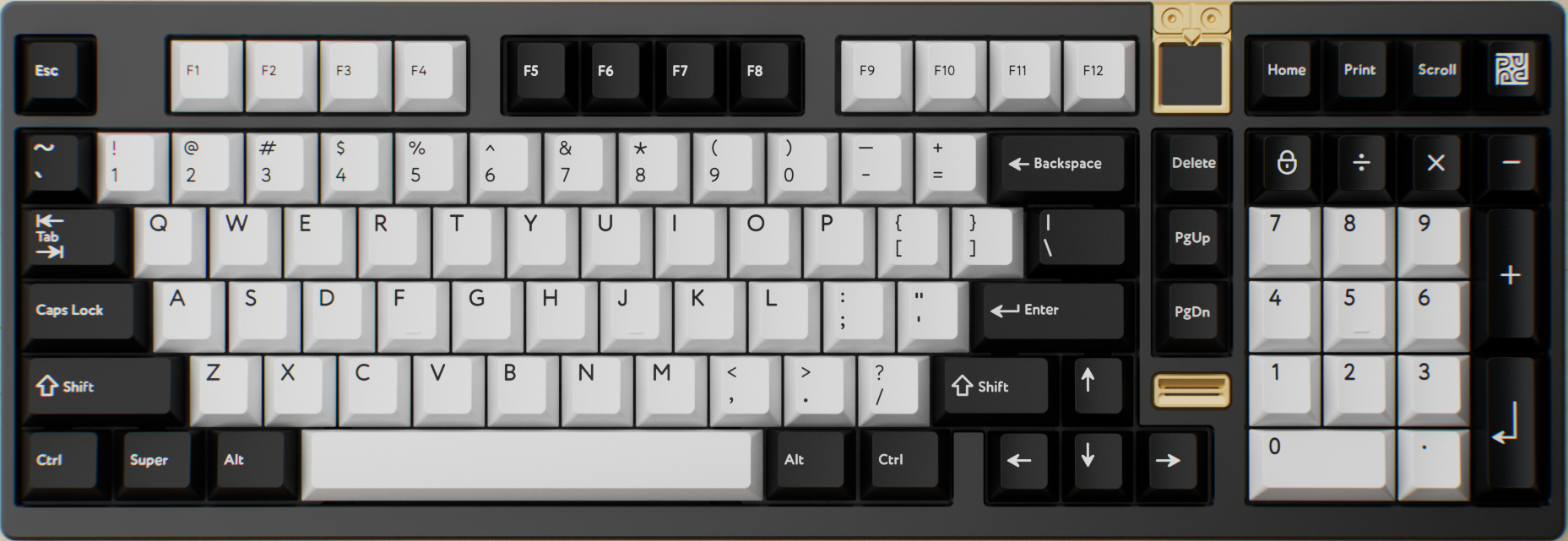
1800 / Compact full-size
Keeps a number pad and function row while compressing the navigation block into the main body. “96%” is closely related, but exact spacing and key positions vary.
Explore 1800 keyboards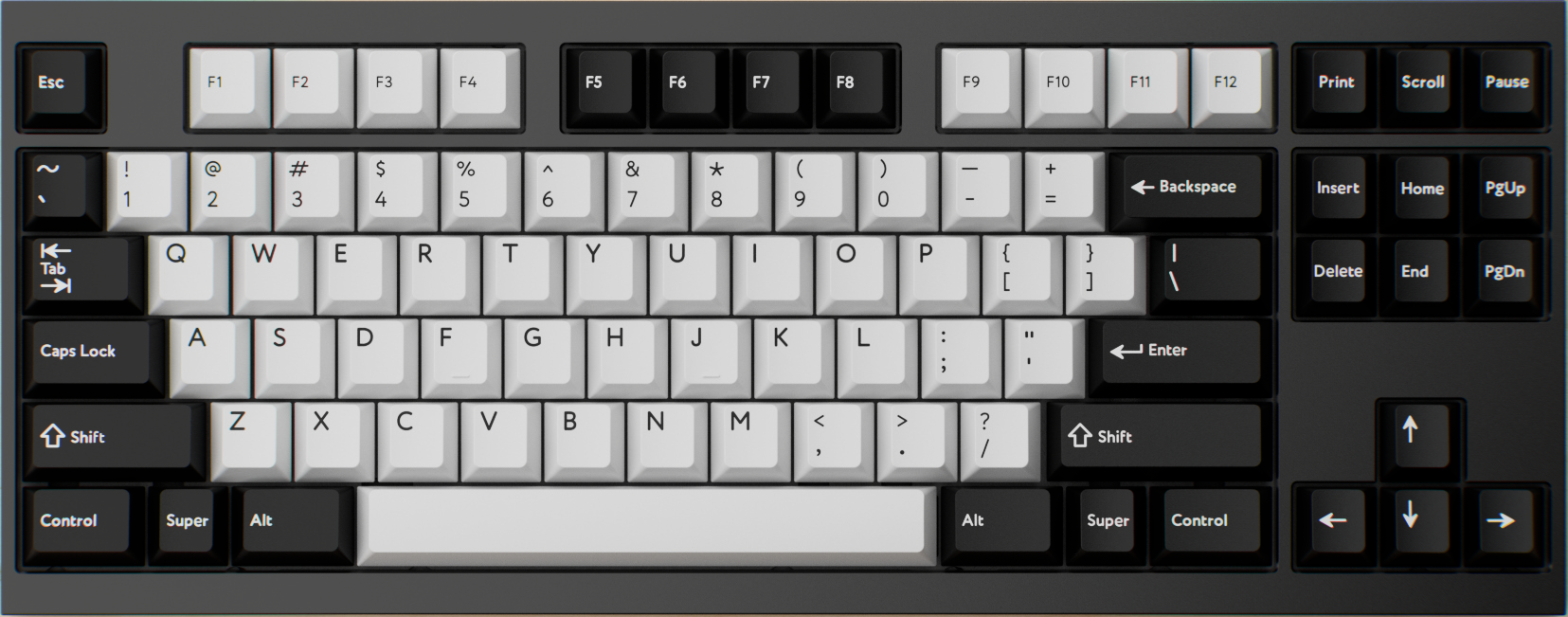
Tenkeyless / TKL
Everything familiar except the number pad. A comfortable bridge between office work and gaming.
Explore TKL keyboards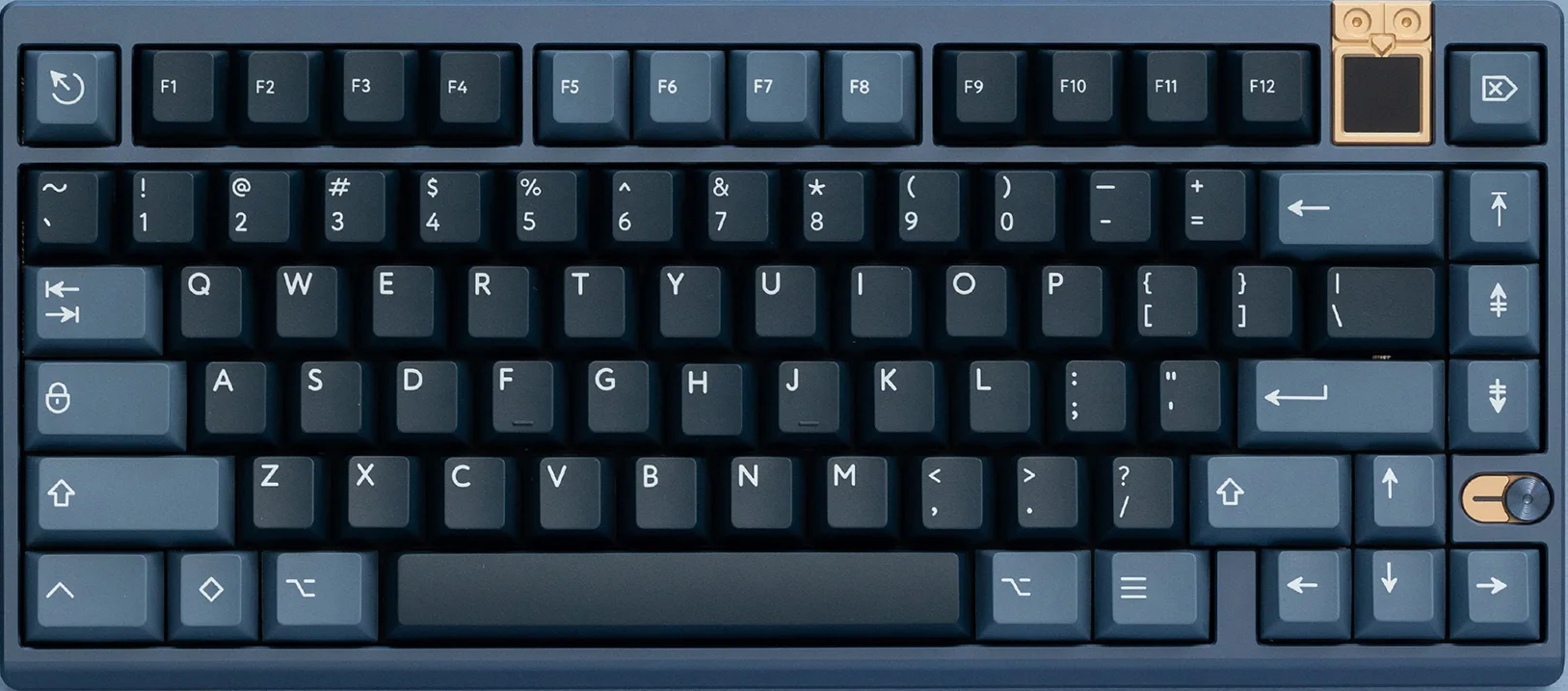
75%
Function row, arrows and useful navigation keys in a compact footprint. The most balanced starting point for many users.
Explore 75% keyboards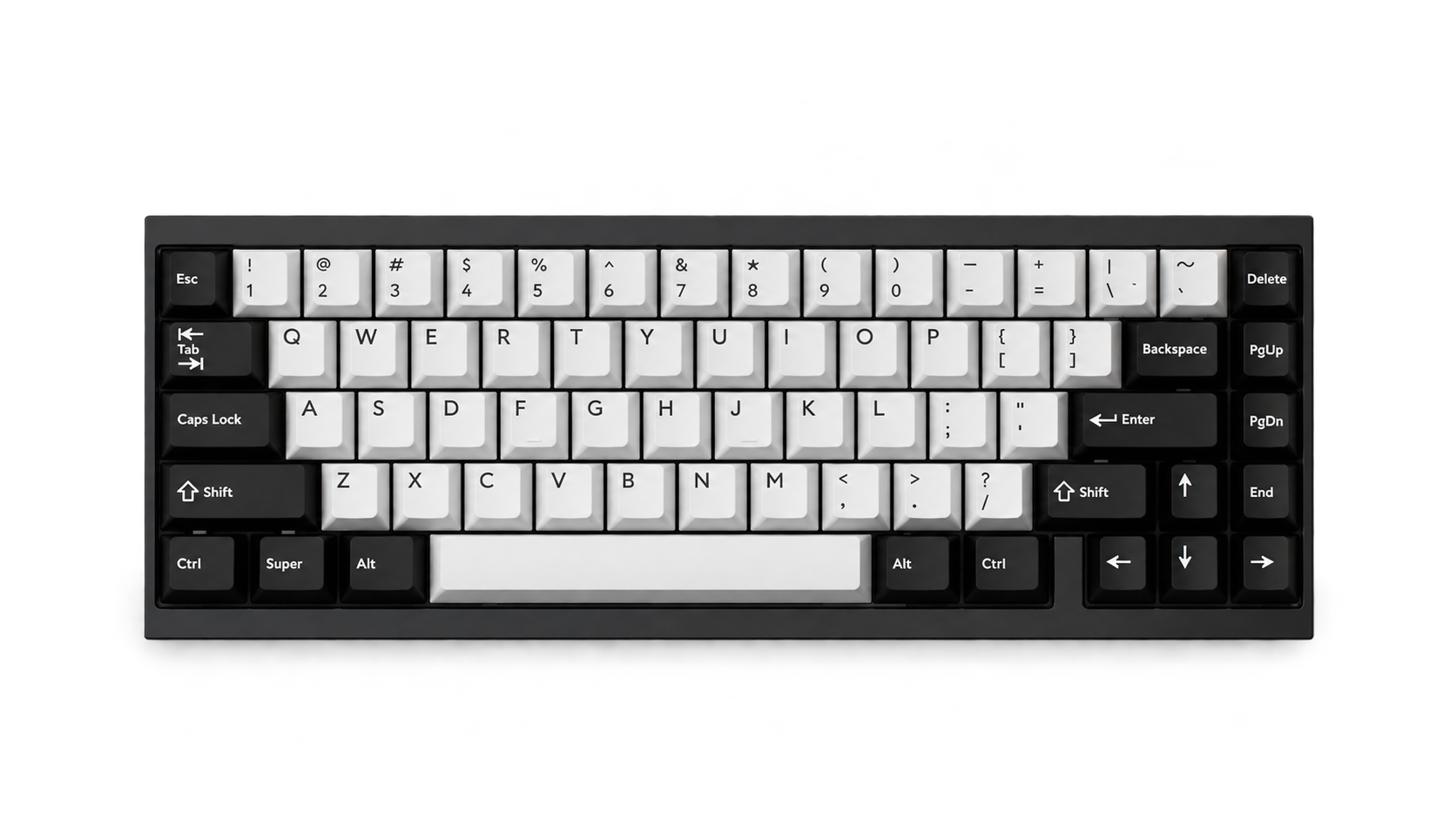
65%
Keeps dedicated arrows while moving the function row to a layer. Compact without feeling extreme.
Explore 65% kits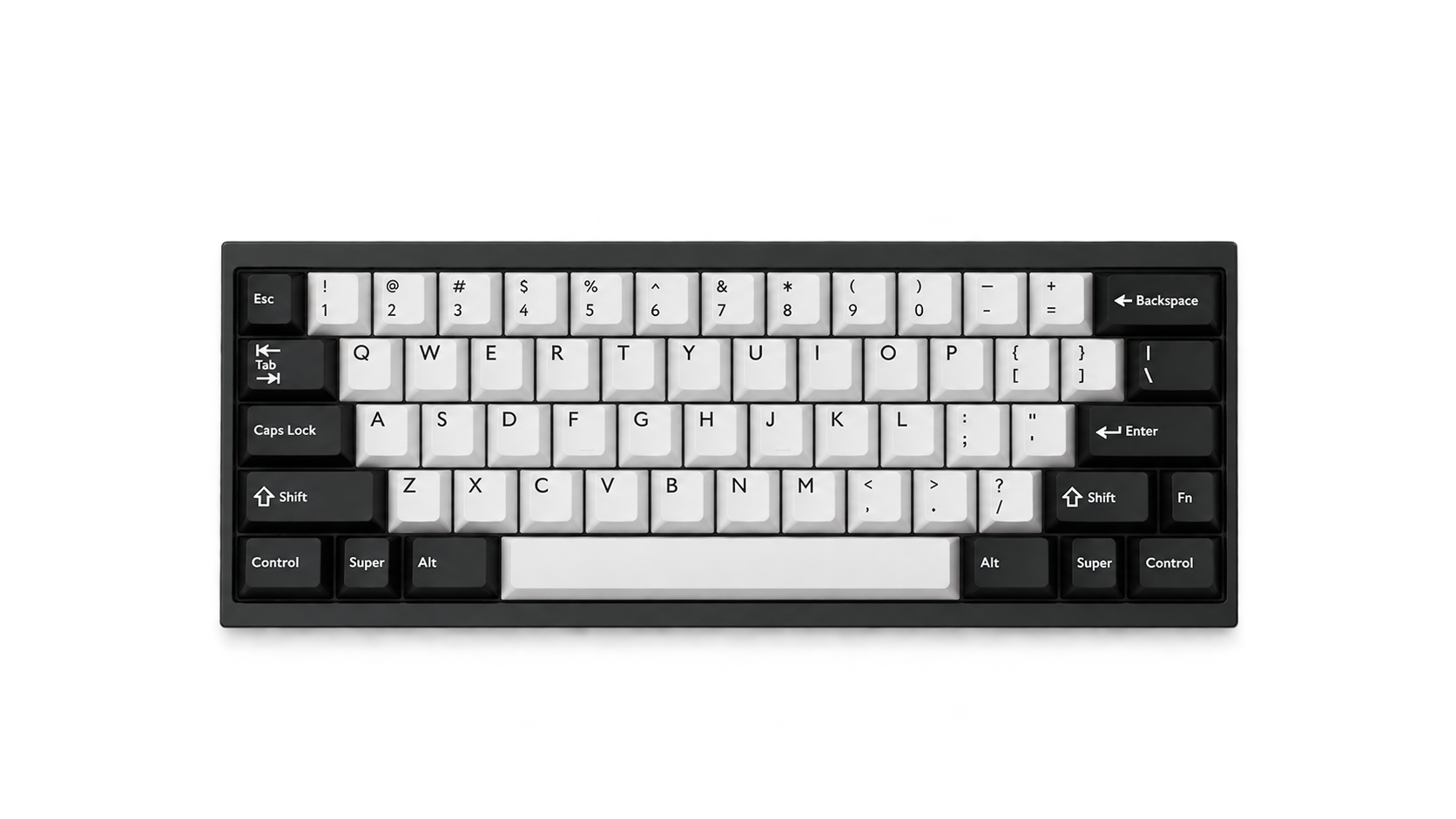
60%
Portable and clean, but arrows and function keys live on layers. Buy only if that workflow feels natural.
Explore 60% kits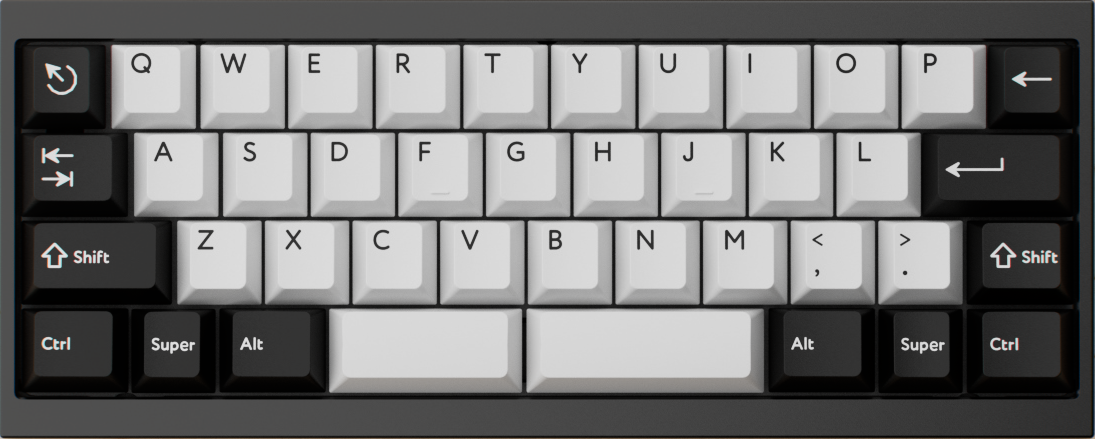
40%
Removes the number row as well as the function row. Numbers and symbols move to programmable layers, making firmware quality essential.
Explore 40% keyboards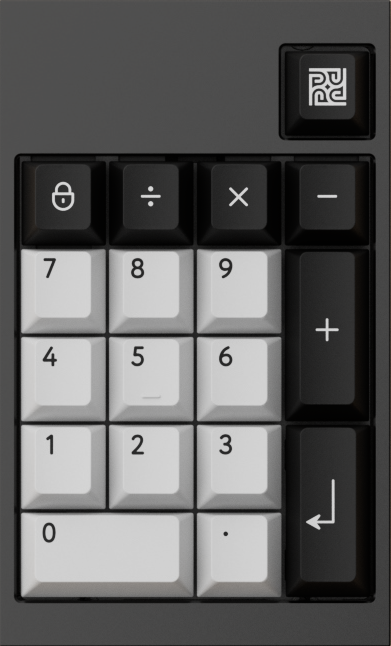
20% / Numpad
Usually a standalone number pad or compact macro pad rather than a complete keyboard. It is useful for data entry, shortcuts, creative controls, or pairing with a smaller main board.
Explore 20% keyboardsRead a layout name in layers.
A keyboard name can combine independent attributes. TKL, 60% and full-size describe the form factor and retained key clusters. WK and WKL describe the bottom-row or case treatment. HHKB-style describes a more specific 60% arrangement, while Alice and Arisu describe angled ergonomic families.
Two terms that look similar are not always equivalent
WKL is not a keyboard size: it can appear on TKL, 60% and full-size boards. HHKB-style is not merely another word for WKL: it normally combines corner blockers with a 7u bottom row and characteristic Control, Backspace and right-Shift choices.
WK
WinkeyA conventional bottom row with Windows/Command keys between Ctrl and Alt. WK is the most familiar and convenient choice for general desktop shortcuts.
WKL
WinkeylessWinkeyless replaces the two GUI-key positions with physical case blockers and commonly uses a centered 7u spacebar bottom row. It is an aesthetic and physical-layout choice, not a smaller keyboard size.
HHKB
60% familyHHKB-style customs usually combine corner blockers, a 7u bottom row, split Backspace and split right Shift. The original HHKB logical layout also places Control where Caps Lock normally sits and moves Backspace down one row.
TKL
Tenkeyless · 80% familyTKL removes the number pad but keeps the function row, arrows and navigation cluster. TKL describes the form factor, not the bottom row: both TKL WK and TKL WKL are common.
Alice
Angled ergonomicAlice-style layouts angle the left and right alpha clusters and typically split the spacebar. The classic form does not require a dedicated arrow cluster. Exact bottom rows, side keys and macro keys vary by PCB.
Arisu
Alice + arrowsArisu is an Alice-inspired family that normally adds dedicated arrow keys and a more extended right side. It offers an easier transition for users who want angled typing without moving arrows to a layer.
Ortholinear
Grid alignedKeys align in straight rows and columns rather than the horizontal stagger inherited from typewriters. Ortholinear describes geometry, not a particular key count.
Split / columnar ergo
Ergonomic family“Ergo” is an umbrella term. Fully split boards separate both halves; column-stagger boards offset columns to follow finger length; many add thumb clusters and tenting.
Regional and advanced layout terms
Compatibility rule
A case label does not prove that every PCB, plate or keycap kit supports the same arrangement. Check the product’s actual layout diagram for spacebar width, stabilizer positions, Enter style, split-key options and hot-swap socket locations before ordering.
Plate material: stiffness first, tone second.
The plate holds switches in alignment and spreads each key press across the assembly. Material matters, but so do thickness, plate geometry, flex cuts, mounting tabs and whether the PCB is 1.2 mm or 1.6 mm. Treat the descriptions below as common tendencies within the same keyboard design.
Aluminum Balanced / precise
Usually medium-stiff with a clear, defined attack. It often produces a brighter tone and controlled key-to-key consistency, which makes it a dependable all-round plate.
Polycarbonate Soft / forgiving
More flexible and acoustically damped than common metal plates. It often softens the attack and shifts the board toward a lower, rounder sound.
FR4 Warm / controlled
The fiberglass material also used for PCBs. It commonly sits between PC and aluminum in stiffness, with a warm, less metallic presentation.
POM Flexible / deep
A low-friction engineering plastic with a softer response. POM can reduce sharpness and favor a deeper sound, though thin POM plates need careful switch seating.
Carbon fiber Light / lively
High stiffness at low weight creates a quick, energetic response. It can sound dry and articulate, often brighter than FR4 without the same metallic edge as some metals.
Brass & steel Rigid / assertive
Dense, stiff metals emphasize a firm bottom-out and strong projection. Brass may add a bright, substantial character; steel can be even more rigid and resonant.
Useful starting choices: aluminum for definition, FR4 for a balanced custom feel, and PC or POM when softness is the priority. KBDfans’ own plate comparisons similarly position aluminum as stiffer and higher-pitched, PC as softer and deeper, and FR4 between the two.
Case material and mounting structure.
The case is both a chassis and an acoustic chamber. Its internal volume, wall thickness, weight, seams and feet can matter as much as the name of the material.
Aluminum Dense / structured
Machined aluminum feels substantial and can deliver a clean, projected sound. Poorly controlled metal-to-metal contact can also create ping, which force-break pads or careful case design can reduce.
Polycarbonate Soft / resonant
A PC case often sounds rounder and less metallic, with more give in the enclosure. It may still sound hollow when the internal cavity is large and untreated.
ABS plastic Light / lively
Injection-molded ABS can sound bright, hollow or pleasantly lively depending on ribs and cavity design. Low mass is not automatically low quality.
Acrylic Layered / bright
Stacked acrylic cases can emphasize a bright, resonant signature. Layer tolerances and fastener tension strongly influence rattles and vibration.
Wood Warm / variable
Wood can absorb and color vibration differently from metal or plastic. Species, grain, moisture and wall thickness create more unit-to-unit variation.
Hybrid builds Tunable
Metal weights, silicone pieces and mixed top/bottom materials can redirect resonance. A heavy weight changes mass, but does not guarantee a deeper sound by itself.
Mounting style changes the path of vibration

Surface finish: protection, color and character.
The case material tells you what the part is made from; the finish tells you what happened to its surface. Finishes primarily change appearance, texture, corrosion resistance and scratch behavior. Their direct acoustic effect is normally much smaller than case geometry, mass, mounting style and internal cavity design.
Anodized Electrochemical oxide
Anodizing grows a hard oxide layer from the aluminum surface, then dye can be absorbed and sealed into it. The result keeps a metallic appearance and usually resists wear better than a simple painted surface. Color and sheen depend on alloy, blasting texture, dye bath and sealing.
E-coating Electrodeposited coating
E-coat places an opaque coating over the metal and is useful for colors that are difficult to achieve by anodizing, especially cream and white. It can look smooth and uniform, but an impact may chip the coating and reveal the metal below. Tight interfaces need correct masking and allowance for coating thickness.
RAW Uncoated metal
RAW usually means the metal is left unfinished or minimally finished after machining or blasting. Tool paths, fine scratches and color variation are part of the industrial look. Bare aluminum, brass and copper react differently, but all require realistic expectations around fingerprints, oxidation and future marks.
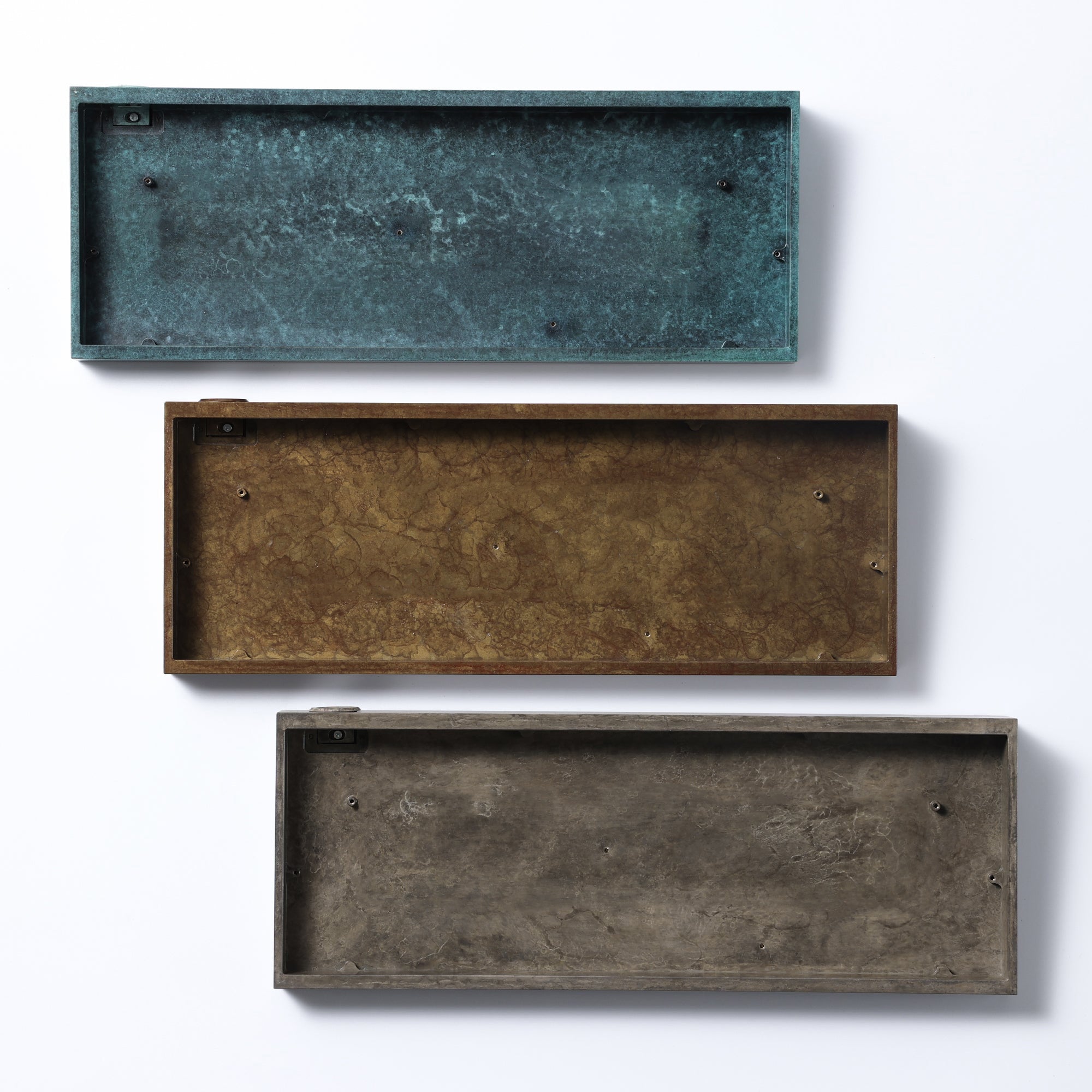
Patina Controlled surface reaction
Patina deliberately reacts copper, brass or bronze to create brown, blue or green variation. Every part is unique, so renders cannot predict the exact pattern. A clear seal can slow further change, while an unsealed surface continues to evolve through touch, air and humidity.
Double anodized Two-color process
In keyboard product language, secondary or double anodization usually describes multiple masking, stripping and anodizing stages used to place two colors on one aluminum part. It is a design process, not “twice the durability.” Boundaries, recesses and tiny transition marks are the difficult areas.
Triple anodized Three-color process
Triple or tri-color anodization adds another color cycle and more process risk. Complex engraving can be integrated into the color separations. The appeal is visual craftsmanship; the number of anodizing stages does not meaningfully improve keyboard sound or typing feel.
Clear anodized Natural-metal appearance
Also called natural or transparent anodizing, this seals aluminum without a strong colored dye so the metallic character remains visible. It is not optically invisible: alloy chemistry, surface preparation and oxide thickness may produce silver, gray, champagne or slightly warm tones.
Paint-filled engraving Color inside recessed details
Often called oil filling in keyboard manufacturing, this adds paint or enamel inside engraved logos and lines after machining and finishing. It improves contrast without changing the whole case color. Fine overflow, tiny voids and long-term wear depend on engraving depth and application quality.
What actually happens in multi-color anodization?
Machine, polish or blast the aluminum so the underlying texture is consistent.
Create the oxide layer and introduce the first color into selected areas.
Protect finished regions, expose new ones, then repeat treatment for the next color.
Seal the porous oxide and inspect boundaries, hook points, recesses and color consistency.
The exact factory sequence can differ, especially when selective stripping, laser work or engraving is involved. “Double” and “triple” should therefore be understood as product-level descriptions of multi-stage color work, not a universal technical standard.
Use a soft microfiber cloth and a small amount of mild, diluted cleaner when needed. Avoid abrasive pads, metal polish and aggressive solvents. Remove keycaps before wet cleaning so liquid cannot reach the PCB.
Handle with clean, dry hands and follow the maker’s sealing instructions. Do not polish a patina unless you intentionally want to remove or change it. Never apply oil or wax near an assembled PCB without disassembling and protecting electronic parts.
Stabilizers: the difference between clean and distracting.
Stabilizers support keys wider than roughly 2u, including Space, Enter, Backspace and Shift. The plastic housings guide both sides while a metal wire keeps the keycap level. Their mounting method must match the PCB and plate.
Plate-mounted
Fast and serviceable
Each housing clips into the plate. Easy to remove after disassembly, but plate cutout tolerance can allow housing movement and rattle.
PCB-mounted
Clip-in or screw-in
Mounted directly to the PCB before the plate. Screw-in designs resist movement; clip-in designs are useful where O-rings or clearance make screws unsuitable.
What incorrect installation sounds and feels like
Loose wire or housing
The wire strikes the housing, or a plate-mounted housing moves inside an oversized cutout. Check seating before adding more lubricant.
Wire imbalance
A slightly bent wire, uneven keycap stem or poorly seated housing creates a tick on one side. Test each side separately before final assembly.
Over-lubed or binding
Too much viscous lubricant, a twisted housing, or interference with foam can make the key feel heavy and return slowly.
Excess material
Thick pads, too much grease or compressed foam under the wire can remove definition and shorten perceived travel.
Not fully seated
If one housing is not flat, or a screw is overtightened, one side may bottom out before the other.
Wrong assembly or key size
An incorrectly clipped wire, incompatible stabilizer length, or forceful keycap removal can disconnect the wire.
Foam or no foam? Remove a problem, not the personality.
Foam absorbs vibration and reduces selected resonances. It can make an inconsistent or hollow keyboard sound more controlled, but a heavily filled board may lose dynamics and make different switches sound more alike.

Use the minimum treatment that solves the problem.
How to build a crisp typing sound.
“Crisp” usually means a fast, well-defined attack with little rattle, low cavity echo and a short decay. It does not have to mean loud or extremely high-pitched.
Starting recipe · not a fixed formula
Definition comes from control, not maximum hardness.
Start with aluminum or carbon fiber for a quick attack; FR4 for a slightly warmer version.
Use a non-flex-cut or moderately flexible PCB with top mount or firmer gaskets for consistent energy transfer.
Choose a stable, cleanly lubed switch with limited housing wobble. Long-pole linears can emphasize bottom-out attack.
Thick Cherry-profile ABS often sounds bright and focused; thick PBT can keep definition with a fuller tone.
Balance wires and use only enough lubricant to remove friction and wire noise. Spacebar quality sets the impression.
Use little or no case foam if the cavity is already clean. Add targeted force-break or a thin layer only when needed.
For a deeper crisp sound, keep the clean stabilizer tuning but move toward FR4/PC, thicker PBT and a controlled amount of case foam. For a brighter crisp sound, favor aluminum/CF, ABS keycaps and minimal full-cavity dampening.
Avoid chasing crispness by stacking every “bright” component. A rigid plate, metal case, long-pole switch and thin keycap can cross from articulate into harsh. Change one variable at a time.
Keycaps: height, shape and how legends are made.
A keycap changes finger position, typing angle, sound and appearance. To compare sets correctly, separate four specifications: material, profile, legend process and layout coverage.
Profile is the keycap’s height and geometry
A profile defines keycap height, top-surface shape and how each row is angled. A sculpted profile uses different shapes across rows; a uniform profile uses the same shape on every row, making keys easier to rearrange.
Cherry Low · sculpted
A familiar medium-low cylindrical profile with restrained sculpting. Popular for both typing and gaming.
OEM Medium · sculpted
Similar row sculpting to Cherry but generally taller. Common on prebuilt mechanical keyboards.
SA Tall · sculpted
A tall spherical profile with a substantial feel and strong acoustic presence. It may require more wrist adjustment.
MT3 Tall · deep dish
Deep, finger-hugging spherical tops with pronounced row sculpting and a retro terminal character.
DSA / KAM Low · uniform
Low, uniform spherical families. Flexible for alternative layouts because a key is not locked to a specific row.
XDA Medium-low · uniform
A broad, flat-looking uniform profile with a large top surface and relaxed row-to-row transition.
KAT / MDA Medium · sculpted
Medium-height sculpted spherical families. They bridge low Cherry-style profiles and taller retro profiles.
MOA Rounded · uniform
A rounded uniform profile often chosen for its soft visual style and broad fingertip contact.
MTNU Medium-tall · sculpted
A modern sculpted spherical profile with a more compact height than classic tall spherical families.
About R1, R2, R3 and R4: these labels identify mold rows, not a universal top-to-bottom numbering system. Some manufacturers label the number row R1 while others use different conventions. Always follow the specific set’s row diagram when buying replacement keys.
Bar, dot and scoop: homing-key terminology
Homing keys help touch typists find the home row without looking. They are normally placed on F and J, and sometimes on numpad 5.
 Barred
A short raised line near the front or center of the keycap.
 Dotted
A small raised bump that gives a precise fingertip reference.
 Scooped / deep dish
A more concave top surface identifies the key by its shape.
Legend manufacturing: where does the character live?
Dye-sublimated
Heat turns dye into gas and drives it into the keycap surface, usually PBT. Because the dye penetrates the plastic, the legend is highly wear-resistant. Standard dye-sub works best with darker legends on lighter keycaps.
Embedded dye · durableReverse dye-sub
Instead of printing only the legend, dye colors the surrounding keycap area while the legend remains the original lighter plastic color. It enables light legends on darker-looking PBT, but requires more coverage and precise color control.
Embedded dye · complex coverageDouble-shot
Two molded plastic parts form the keycap body and legend. The character passes through the cap instead of sitting on top, so normal surface wear cannot erase it. Material, mold quality and wall thickness still determine overall quality.
Separate plastic · permanent legendTriple-shot
Three molded plastic components allow a third color, commonly for contrasting sublegends. It offers durable multi-color legends but requires more complex molds and can cost more than double-shot.
Three plastics · multi-colorUV printed
UV-curable ink is printed onto the surface and hardened with ultraviolet light. It supports detailed illustrations, gradients and many colors that are difficult to mold. A protective coating can improve wear resistance, but the artwork remains surface-applied.
Surface print · high detailLaser etched / engraved
A laser removes, darkens or changes the surface to create the legend. Some designs add a contrasting infill afterward. Results range from subtle permanent engraving to coated caps whose exposed legends may become polished with use.
Modified surface · process variesPad printed
Ink is transferred onto the keycap surface with a silicone pad. It is affordable and flexible for unusual graphics, but generally wears sooner than dye-sub or molded legends unless protected by a durable clear coat.
Surface ink · economicalBacklit / shine-through
Backlit describes light passing through the legend; it is not one specific printing process. Common methods include translucent double-shot plastic or laser-ablating an opaque coating over a translucent cap. LED orientation affects brightness and coverage.
Lighting feature · check LED positionSublegends: scripts, input systems and visual language
A primary legend is the main character on a key. A sublegend is a smaller secondary character, symbol or command printed beside it. Sublegends may show another writing system, an input-method mapping, a firmware layer—or simply support the visual theme.
A sublegend does not change keyboard output
Installing Japanese, Korean or Cyrillic keycaps does not activate that language or convert an ANSI PCB into JIS. Output is controlled by the operating-system input source, firmware and key mapping. The printed mapping may also be decorative or adapted to an ANSI keyset.
Hiragana
One of Japan’s two phonetic kana syllabaries, used for native words, grammatical endings and words without common kanji. On keycaps, Hiragana sublegends often reference kana input positions.
Japanese phonetic scriptKatakana
The second Japanese kana syllabary, commonly used for loanwords, names, technical terms and emphasis. Katakana sets are popular aesthetically; always check whether the mapping is functional or stylized.
Japanese phonetic scriptKanji
Logographic characters used in Japanese. Because thousands of kanji exist and are composed through an input method, they do not form a standard one-character-per-key alpha layout. They appear more often as novelties or theme graphics.
Not a standard alpha mappingHangul
The Korean writing system. Individual consonant and vowel letters, called jamo, are arranged on keys and combine into syllable blocks during typing. A printed Hangul set still requires a Korean input source.
Korean · jamo mappingCyrillic
A script used by Russian, Ukrainian, Bulgarian and other languages. “Cyrillic sublegends” does not identify one universal national layout; letter positions and additional characters differ by language.
Multiple national layoutsGreek
The Greek alphabet shown alongside Latin legends. Most themed sets focus on alpha characters; confirm whether punctuation and language-specific positions match the input layout you plan to use.
Alphabetic sublegendsZhuyin / Bopomofo
A phonetic symbol system widely used for Mandarin input and education in Taiwan. Zhuyin legends represent sound components and tones rather than direct Latin-letter translations.
Traditional Chinese phonetic inputCangjie
A shape-based Traditional Chinese input method. Keys are labeled with Cangjie roots such as 日, 月, 金 and 木; users combine roots to construct characters.
Traditional Chinese shape inputWubi
A shape-based Simplified Chinese input method that groups character components by keyboard zone. Wubi legends are functional references for trained users, not a second alphabet.
Simplified Chinese shape inputArabic
Arabic letters are printed beside Latin legends for a right-to-left writing system. Regional conventions and operating-system layouts can differ, so visual coverage should be checked against the intended locale.
Right-to-left scriptHebrew
Hebrew sublegends support another right-to-left script. As with Arabic, direction is handled by software; the physical keycaps only provide character references.
Right-to-left scriptThai and Devanagari
These scripts require more characters and marks than a simple A–Z substitution suggests. Verify the completeness and accuracy of the specific keyset rather than assuming any decorative set supports full native typing.
Complex-script coverage variesRunes / Futhark
Historical Germanic runic alphabets frequently used as thematic sublegends. They are generally decorative in modern keyboard sets unless the designer publishes a defined transliteration mapping.
Usually thematicFictional scripts
Licensed or fan-inspired writing systems may appear as sublegends and novelties. Their purpose is primarily visual, and they may be UV printed when dedicated injection molds are impractical.
Decorative · licensing may applyFunctional sublegends
Not all sublegends are languages. Front or top secondary legends can show media controls, Bluetooth channels, lighting commands and layer functions specific to a keyboard.
Firmware-layer referenceRelated legend terminology
Manufacturing matters: a sublegend does not automatically mean triple-shot. The primary legend may be double-shot while the sublegend is UV printed; a PBT set may dye-sub both legends; or all three colors may be separately molded. PBTfans currently supports selected Latin and Katakana arrangements with double-shot, selected Hiragana, Runes and Greek combinations with triple-shot, and other designs through UV printing or dye-sub depending on the project.
ABS, PBT and other materials
ABS supports vivid colors, sharp double-shot molding and a bright, focused sound, but frequently used surfaces can become glossy. PBT usually resists shine longer and often feels more textured, though PBT blends and manufacturing methods vary. Polycarbonate, resin, aluminum and other specialty caps are normally used as accents because their weight, feel and switch-stem stress differ from a complete plastic set.
Stem compatibility: MX and Topre are different mounts
The stem interface is the mechanical connection between the underside of a keycap and the switch or slider beneath it. Profile and stem are separate specifications: two Cherry-profile keycaps can look identical from above while using incompatible mounts underneath.
MX stem Cross-shaped socket
The underside of an MX-compatible keycap has a cross-shaped socket that presses onto the switch stem. It is used by Cherry MX and a very large number of mechanical, Hall Effect and MX-style clone switches.
Topre stem Proprietary slider mount
Traditional Topre keycaps attach to the Topre slider with a different round mounting system. Standard MX keycaps do not press directly onto it, so replacement sets are less common and must explicitly state Topre compatibility.
The drawings show the identifying geometry, not engineering dimensions. Stem tolerances vary: a socket that is too tight can stress or crack the keycap stem, while a loose socket can wobble or lift off during removal.
| Keyboard or slider | MX keycaps | Topre keycaps | What to verify |
|---|---|---|---|
| Cherry MX / MX-style switch | Direct fit | No direct fit | Key sizes, stabilizers and switch travel |
| Traditional Topre slider | Adapter or slider conversion | Direct fit when model/layout matches | HHKB vs Realforce layout and Space bar sizes |
| EC board with MX-compatible slider | Usually supported | Usually not | Exact slider specification from the keyboard maker |
| Custom EC / Topre-compatible system | Model-dependent | Model-dependent | PCB, plate, housing, slider height and stabilizer system |
| HHKB Studio | MX-compatible | Not a Professional-series Topre mount | Special B/G/H pointing-stick keycaps |
| HHKB Professional series | No direct fit | Topre HHKB set | Exact HHKB generation and layout coverage |
MX sliders, adapters and EC terminology
Adapters and replacement sliders can expand keycap choice, but they may alter key height, stem wobble, bottom-out sound and stabilizer alignment. Custom EC systems can also use different switch heights or plates; follow the exact keyboard manufacturer’s compatibility list.
Kit and compatibility vocabulary
Before buying a keycap set
Check the largest compatibility traps: ANSI or ISO Enter, 6.25u or 7u Space, 1.75u right Shift on many 65%/75% boards, 1u bottom-row modifiers, split Space bars for Alice/Arisu, numpad coverage and the correct sculpted row for every nonstandard key.
IC, GB, pre-order: know what you are buying.
Custom keyboards and keycaps are often produced in batches instead of continuously. A product badge tells you where the project sits in that lifecycle—and whether you are buying an available item, reserving future production, or only expressing interest.
This is the typical path, not a guarantee. Pre-order can branch into the process before or during production, and some well-established products may move directly from preorder to regular in-stock sales.
IC / Interest Check
No purchase yetThe designer or vendor is testing demand and collecting feedback on colors, layouts, kits and price targets. Renders, specifications, vendors and even whether the project proceeds can still change.
- Payment
- Normally none
- Certainty
- Concept or prototype stage
- Your action
- Submit feedback or join notifications
Coming Soon
WatchThe product has been announced but ordering is not open. Compared with IC, specifications may be further along, but the final date, price and available configurations still need confirmation.
- Payment
- Not yet
- Certainty
- Varies by project
- Your action
- Read updates; do not treat renders as stock
GB / Group Buy
Order windowA time-limited paid order funds or confirms a production batch. Manufacturing and fulfillment normally happen after the window closes, so this is a commitment to wait—not an immediate shipment.
- Payment
- Usually charged at checkout
- Timeline
- Months; estimates can move
- Main risk
- Delay, color revision or production change
Pre-order
Reserve a unitYou reserve an item that is planned, ordered from the factory or already in production. It may carry less demand-validation uncertainty than an early group buy, but it still does not mean the item is ready to ship.
- Payment
- Usually charged at checkout
- Timeline
- Future estimated ship date
- Main risk
- Production or logistics delay
In Production
ManufacturingThe order window has usually closed and manufacturing, finishing, color matching, packaging or quality control is underway. It describes progress, not necessarily whether new orders are accepted.
- Payment
- Earlier buyers already paid
- Timeline
- Follow the project journal
- Your action
- Check dated updates, not only the original ETA
Extras
Limited stockExtra units are sold after the main batch, commonly to cover replacements, vendor allocation or surplus. Quantities and configuration choices are limited, and group-buy extras may be treated as final sale.
- Payment
- Charged at checkout
- Timeline
- Often faster than joining the original GB
- Main risk
- Limited choice and stricter sale terms
In Stock
Available nowThe item is physically available for normal order processing. Assembly, lubrication or other services can still add preparation time, and a displayed variant may sell out before another one.
- Payment
- Charged at checkout
- Timeline
- Normal processing plus delivery
- Your action
- Confirm the exact variant says in stock
Ready to Use
Build conditionThis means the keyboard is assembled with the listed switches and keycaps. It is not a lifecycle stage: a ready-to-use board can separately be in stock, on preorder or backordered.
- Assembly
- Built configuration
- Timeline
- Depends on its stock badge and service queue
- Check
- Exact keycaps, switches, layout and firmware
Before paying for a future product
Read the order as a commitment, not just a product page.
- Confirm whether the badge applies to the product or only your selected variant.
- Read exactly what the kit includes; PCB, plate, stabilizers, switches and keycaps may be separate.
- Find the latest dated production update instead of relying only on the launch ETA.
- Review cancellation, final-sale, warranty and defect-reporting terms before checkout.
- Check whether mixing in-stock and GB items causes the complete order to ship together later.
- Allow for international duties, VAT, carrier fees and address restrictions.
KBDfans-specific note: current store policy states that keyboard group buys commonly require a multi-month production period, while orders combining in-stock and group-buy items may be held until all items are ready. Cancellation and refund terms can change, so the current policy and individual product page should take priority over any general guide.
View KBDfans project updates